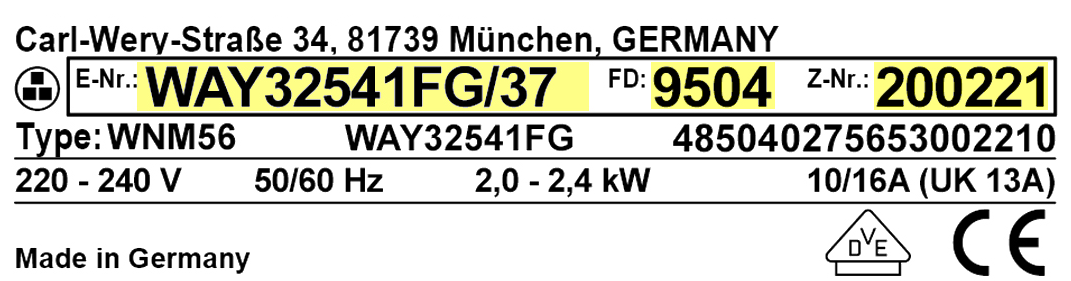
You'll need the Model Number (E-Nr), FD Number, Serial Number (SERNR, Z-Nr or part of the FD Number), and Delivery Date.
Wondering where to find these numbers? They're on the rating plate label located on your appliance.
Please view the image carousel for examples of the rating plate label
You can also find this information in the Home Connect app once your appliance is connected Using a mobile device? Tap the camera icon to instantly scan the Model Number from the rating plate.
Step 2: Save Your Registration
To save your registration, simply log in to your MyBosch account or create one on the next page.
Already logged into your MyBosch account? Simply click on the blue Register button.
Step 3: Confirm Your Registration
Visit the "My Appliances" section in your account to see your registered appliance.
Failure to register will not affect your warranty rights.
At Bosch, we continuously aim to improve our website and the information we provide. We would like to invite you to take part in an optional one minute survey.
If you wish to be contacted by us, please use our regular contact form here, contact Customer Support at (800) 944-2904, or chat online with a Customer Support representative. Thank you.